
Open roles cleanly, with the right approvals
Templated briefs, multi-stage approval chains with budget gates, and visibility into where every requisition is — designed around how org actually approves headcount.
Brief templates
Per family — engineering, sales, leadership.
Approval chains
Reflect your org structure, not the system's.
Budget gates
Auto-routed to finance over a configurable threshold.
SLA tracking
Days-open vs. SLA — visible to manager and recruiter.
Headcount planning
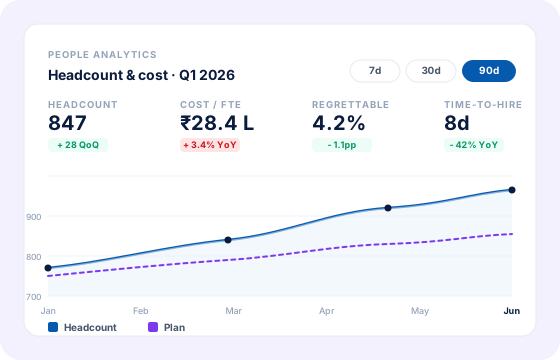
Live spend vs. annual plan, by team and entity.
Reports
Funnel from req to hire, by team and recruiter.
A brief everyone agrees on, before sourcing starts
Templates capture the role, level, band, panel and approval chain. The hiring manager fills in 6 fields and the requisition is ready — not after a 3-week negotiation.
- Templates per family with band, level and panel pre-filled.
- Free-text fields for role-specific context (team mission, etc.).
- Versioned — you see what changed between drafts.
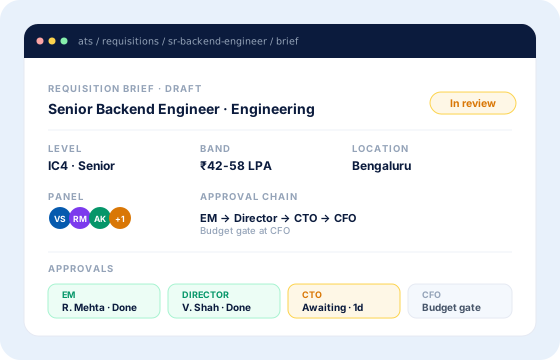
Approvals routed by org and budget
Approval chains reflect how your org actually approves — manager, director, VP, with auto-routed budget gates to finance over a threshold. No more chasing signatures.
- Multi-step chains with role-based approvers.
- Budget gates that auto-route to finance over a threshold.
- SLA-aware nudges; escalation when an approver is slow.
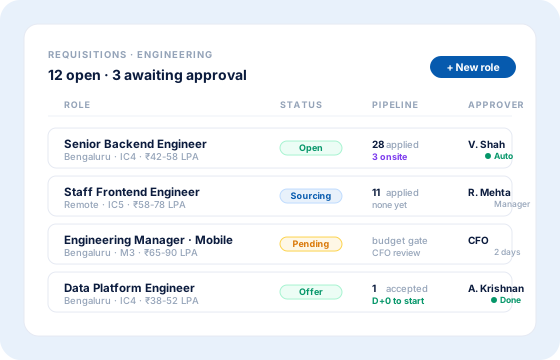
A live view across every open role
Status, approver, days-open, pipeline progress — in one view. The hiring leader sees what's blocked; the recruiter knows where to push.
- Filterable list view across teams, locations, status.
- Funnel report from req to hire, with stage-level drop-off.
- Live spend vs. annual headcount plan.
Common questions
Yes. Chains are configurable per team, role family, location and entity. Steps can be conditional (e.g., CFO only over a threshold).
Configure a budget per team or entity. Requisitions over a configurable threshold auto-route to finance with the budget context attached. Spend is live, not at month-end.
Yes — templates and guard-rails make it safe. Recruiter is auto-cc'd for review; the brief locks once approvals start.
Yes. Approved requisitions decrement the team's plan; closed requisitions release the slot. Finance and HR see the same numbers.